
What Is a Technical SEO Audit?
A technical SEO audit examines the infrastructure that allows search engines to find, crawl, interpret, and rank your pages. It’s not about keywords or backlinks — it’s about making sure the technical foundation of your site isn’t silently killing your rankings.
I run technical audits for SaaS and B2B sites regularly, and the pattern is consistent: even well-designed sites have 5–10 technical issues hiding in plain sight. A single misplaced noindex tag can make your best content invisible. A slow server response can tank your Core Web Vitals. An orphaned page with no internal links will never rank, no matter how good the content is.
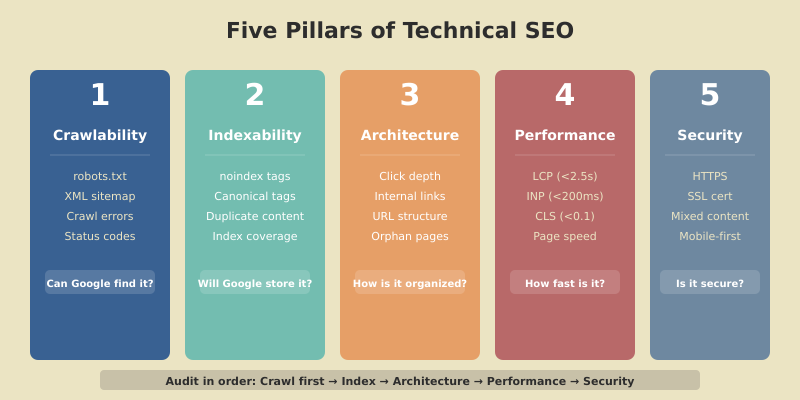
This step-by-step checklist covers every area of a technical audit — crawlability, indexing, site architecture, performance, and security. Use it quarterly to catch issues before they compound. If you want the broader strategic context, our SEO strategy playbook covers how technical SEO fits alongside content and authority building.
Before You Start: Tools You’ll Need
| Tool | Purpose | Cost |
|---|---|---|
| Google Search Console | Indexing status, crawl errors, Core Web Vitals | Free |
| Screaming Frog | Full site crawl — status codes, redirects, meta tags | Free (500 URLs) / $259/yr |
| PageSpeed Insights | Core Web Vitals, performance scoring | Free |
| Google Rich Results Test | Structured data validation | Free |
| Ahrefs / Semrush | Site audit module, backlink profile | $99+/mo |
You can complete a solid audit with just the free tools. Screaming Frog’s free version handles up to 500 URLs, which covers most SaaS sites.
Step 1 — Crawlability
If search engines can’t crawl your pages, nothing else matters. This is where every audit should start.
Check robots.txt
Visit yourdomain.com/robots.txt and verify:
- Important directories aren’t blocked (
Disallow:should only cover admin areas, staging, and internal tools) - Your XML sitemap is referenced (
Sitemap: https://yourdomain.com/sitemap.xml) - No accidental wildcard blocks (
Disallow: /blocks everything — I’ve seen this in production more than once)
Validate Your XML Sitemap
Your sitemap should:
- Include only pages you want indexed (no
noindexpages, no redirects, no 404s) - Be submitted in Google Search Console under Sitemaps
- Return a
200status code (not a redirect) - Be under 50MB and contain fewer than 50,000 URLs per file
Identify Crawl Errors
In Google Search Console, go to Pages (formerly Coverage). Check for:
- Server errors (5xx) — your server is failing to respond to Googlebot
- Not found (404) — pages that Google knows about but can’t find
- Redirect errors — chains, loops, or redirects to error pages
- Crawled but not indexed — Google found the page but decided not to index it (quality signal)
Quick index check
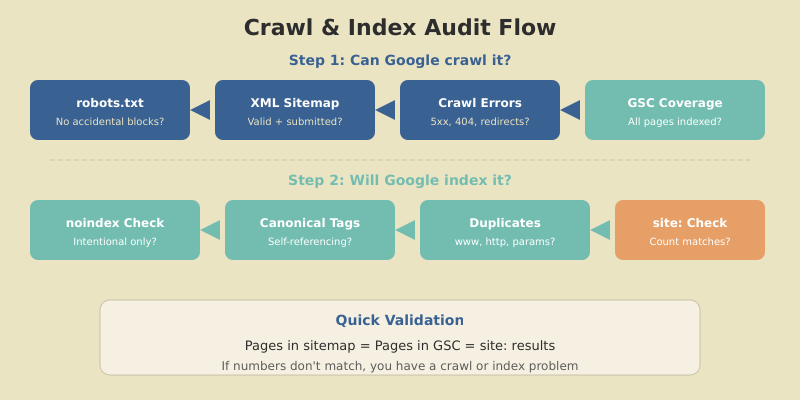
Search site:yourdomain.com in Google. Compare the number of results with the number of pages in your sitemap. If Google shows significantly fewer pages, you have an indexing problem. If it shows more, you may have duplicate content or unwanted pages being indexed.
Step 2 — Indexing
Crawlability gets Google to your pages. Indexing determines which pages Google actually stores and returns in search results.
Check for Noindex Issues
Run a Screaming Frog crawl and filter for pages with noindex in the meta robots tag or HTTP header. Verify that every noindex page is intentionally excluded. Common accidental noindex situations:
- Development
noindextags left in place after launch - WordPress “Discourage search engines” checkbox accidentally enabled
- Yoast SEO advanced settings set to
noindexon individual posts
Audit Canonical Tags
Every indexable page should have a self-referencing canonical tag (<link rel="canonical" href="...">). Check for:
- Missing canonicals — pages without any canonical tag
- Conflicting canonicals — the canonical points to a different page (is this intentional?)
- Canonical chains — page A canonicalizes to page B, which canonicalizes to page C
- HTTP/HTTPS mismatches — canonical uses
http://but page serves onhttps://
Check for Duplicate Content
Duplicate content confuses Google about which page to rank. Common sources:
- www vs. non-www — both versions accessible (fix: redirect one to the other)
- HTTP vs. HTTPS — both versions accessible (fix: redirect HTTP to HTTPS)
- URL parameters —
?sort=priceor?page=2creating duplicate versions - Trailing slashes —
/page/and/pageboth resolving
Step 3 — Site Architecture
Site architecture determines how link equity flows through your site and how easily users (and crawlers) can find your content.
Click Depth
Every important page should be reachable within 3 clicks from the homepage. As The HOTH’s technical SEO research confirms, the further a page is from your homepage, the less crawl priority it receives and the less likely it is to rank.
In Screaming Frog, check the Crawl Depth tab. Pages at depth 4+ are at risk. Fix by:
- Adding internal links from higher-level pages
- Including deep pages in navigation or sidebar widgets
- Building content clusters that naturally link deep pages to pillar pages
Internal Linking Audit
Check for:
- Orphan pages — pages with zero internal links pointing to them (Screaming Frog can identify these by comparing crawled URLs with sitemap URLs)
- Broken internal links — links pointing to 404 pages or redirects
- Link equity distribution — are your most important pages receiving the most internal links?
URL Structure
Audit your URL patterns for:
- Descriptive, keyword-rich URLs —
/seo-strategy-guide/not/p=123 - Consistent hierarchy —
/blog/category/post-name/across all content - No unnecessary parameters — clean URLs without
?ref=or&session= - Hyphens, not underscores — Google treats hyphens as word separators
Step 4 — Core Web Vitals and Performance
Google confirmed that Core Web Vitals are a ranking signal. Sites that pass all three metrics have a measurable advantage when competing against pages with similar content quality.
The Three Metrics
| Metric | What It Measures | Good | Poor |
|---|---|---|---|
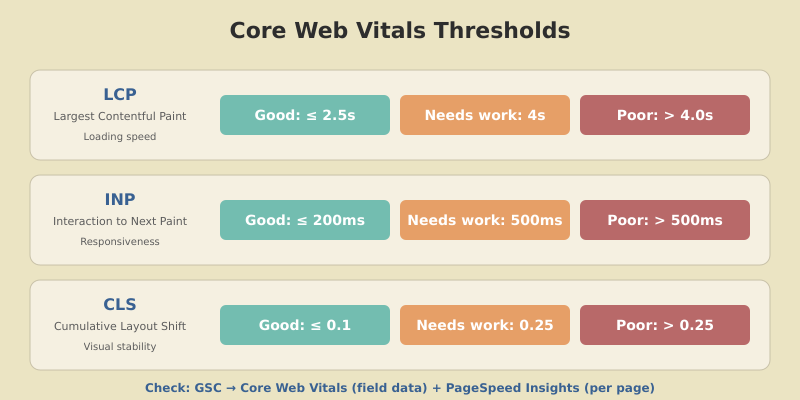
| LCP (Largest Contentful Paint) | Loading speed — when the biggest element loads | ≤ 2.5s | > 4.0s |
| INP (Interaction to Next Paint) | Responsiveness — delay when user interacts | ≤ 200ms | > 500ms |
| CLS (Cumulative Layout Shift) | Visual stability — how much the page shifts | ≤ 0.1 | > 0.25 |
Check your Core Web Vitals in two places:
- GSC → Core Web Vitals report — shows field data (real user metrics) across your entire site
- PageSpeed Insights — per-page analysis with specific fix recommendations
Common Performance Fixes
- LCP too slow? — Optimize hero images (WebP format, proper sizing), preload critical resources, improve server response time (TTFB)
- INP too high? — Reduce JavaScript execution time, break up long tasks, defer non-critical scripts
- CLS too high? — Add explicit
widthandheightto images and ads, avoid injecting content above the fold after load
Step 5 — Mobile and Security
Mobile-Friendliness
Google uses mobile-first indexing — the mobile version of your site is what Google crawls and ranks. Verify:
- Responsive design works across all page types (check on an actual phone, not just desktop dev tools)
- Text is readable without zooming (minimum 16px font on mobile)
- Tap targets are large enough (minimum 48×48px with spacing)
- No horizontal scrolling on any page
- Content parity — mobile version has the same content as desktop
HTTPS and Security
- All pages serve on HTTPS — run a Screaming Frog crawl and filter for any
http://URLs - SSL certificate is valid — check expiration date, ensure it covers all subdomains
- Mixed content resolved — no images, scripts, or stylesheets loading over HTTP on HTTPS pages
- HTTP → HTTPS redirects — all HTTP requests 301 redirect to HTTPS
Step 6 — Structured Data
Structured data helps Google understand your content and can unlock rich results (FAQ dropdowns, breadcrumbs, review stars).
For SaaS and content sites, prioritize:
- FAQPage schema — for articles with FAQ sections (generates expandable Q&A in search results)
- Article / BlogPosting schema — identifies your content as articles with author, date, and publisher
- Breadcrumb schema — shows navigation path in search results
- Organization schema — establishes your brand entity
Validate your structured data with Google’s Rich Results Test. Fix any errors or warnings before moving on.
The Quarterly Audit Schedule
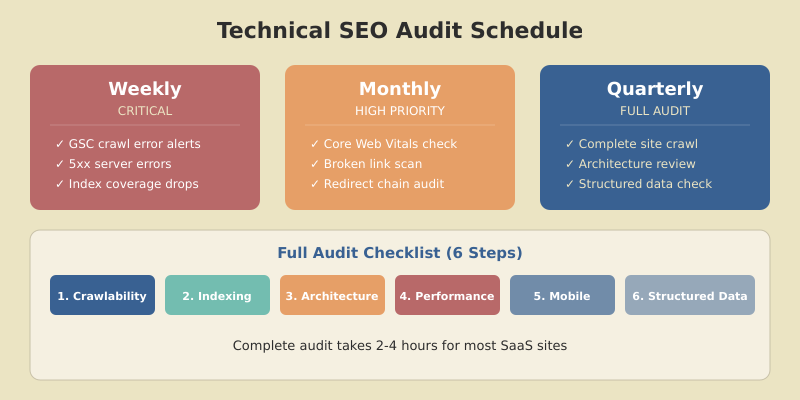
Technical SEO isn’t a one-time project. Issues accumulate — new pages get published without canonical tags, redirects break, performance degrades as features are added. Schedule audits quarterly using this priority order:
| Priority | Check | Frequency | Tool |
|---|---|---|---|
| Critical | Crawl errors, indexing issues, 5xx errors | Weekly (GSC alerts) | Google Search Console |
| High | Core Web Vitals, broken links, redirect chains | Monthly | Screaming Frog + PSI |
| Standard | Full site crawl, architecture, structured data | Quarterly | Full audit (this checklist) |
FAQ
How often should I run a technical SEO audit?
Run a comprehensive technical audit quarterly. Monitor critical metrics (crawl errors, indexing status) weekly through Google Search Console alerts. Check Core Web Vitals and broken links monthly. Sites that publish content daily or have frequent code deployments may need more frequent audits.
What are the most important things to check in a technical SEO audit?
Start with crawlability and indexing — check robots.txt, XML sitemap, and Google Search Console Coverage report. Then verify Core Web Vitals pass thresholds (LCP under 2.5s, INP under 200ms, CLS under 0.1). Finally, audit canonical tags, internal linking, and mobile-friendliness. Fix crawl-blocking issues before anything else.
Can I do a technical SEO audit with free tools?
Yes. Google Search Console, PageSpeed Insights, Rich Results Test, and Screaming Frog’s free version (500 URLs) cover the essential checks. Paid tools like Ahrefs or Semrush add convenience with automated scheduling and historical tracking, but the core audit is fully achievable with free tools.
What is crawl depth and why does it matter for SEO?
Crawl depth is the number of clicks required to reach a page from the homepage. Pages at depth 1–3 get crawled more frequently and receive more link equity. Pages at depth 4 or deeper are harder for search engines to find and less likely to rank. Keep all important content within 3 clicks of the homepage.
How do Core Web Vitals affect SEO rankings?
Core Web Vitals (LCP, INP, CLS) are a confirmed Google ranking signal. They measure loading speed, interactivity, and visual stability. Sites that pass all three metrics have a measurable ranking advantage over competitors with similar content quality. Failing Core Web Vitals won’t tank your rankings alone, but passing them removes a potential disadvantage.
Start Your Audit Today
A technical SEO audit isn’t glamorous, but it’s the foundation everything else rests on. The best content in the world won’t rank if Google can’t crawl it, and the most authoritative backlinks won’t help if your canonical tags are pointing to the wrong page.
Start with Step 1: open Google Search Console, check your Coverage report, and fix any crawl errors. Then work through the checklist section by section. Most sites can complete a full audit in 2–4 hours, and the issues you find will have immediate ranking impact once fixed.
For the complete SEO strategy framework — including content optimization, topical authority building, and AI Overviews optimization — check our pillar guide. Technical SEO is the foundation; content and authority are how you build on it.