
What Is a Content Hub?
A content hub is a structured collection of interlinked pages organized around a central topic. At its center sits a pillar page — a comprehensive overview of the broad subject. Around it, cluster pages (also called satellite articles) dive deep into specific subtopics. Internal links connect everything, telling both readers and search engines that your site covers this topic completely.
Think of it as a textbook: the pillar page is the chapter overview, and cluster pages are the detailed sections. Together, they form a content hub that builds topical authority — the kind of comprehensive coverage that Google rewards with higher rankings.
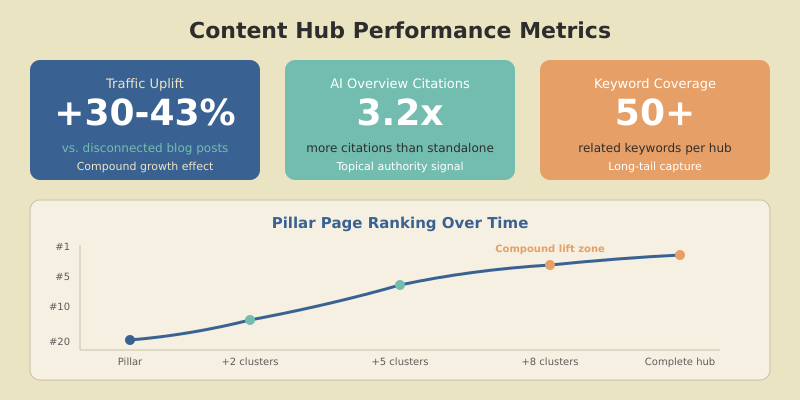
I’ve built content hubs for multiple SaaS and B2B sites. The results are consistent: clustered content drives 30–43% more organic traffic than disconnected blog posts targeting the same keywords. In 2026, with Google’s AI Overviews citing topical authorities more frequently, the hub model is more valuable than ever.
Content Hub vs. Blog vs. Resource Center
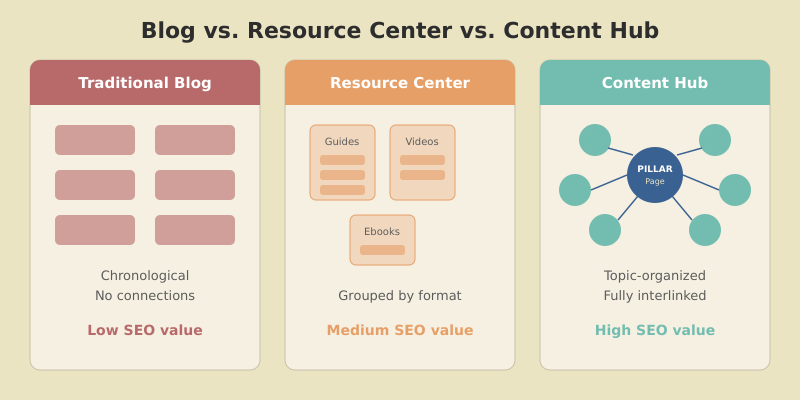
These terms get thrown around interchangeably, but they’re structurally different:
| Structure | Organization | SEO Value | Best For |
|---|---|---|---|
| Traditional blog | Chronological, no structure | Low — no topical signals | News, updates |
| Resource center | By format (guides, ebooks, webinars) | Medium — some grouping | Lead gen content |
| Content hub | By topic, pillar + clusters | High — strong topical authority | SEO, thought leadership |
A content hub is deliberate. Every page exists because it fills a specific role in the topic coverage — not because someone had a content idea on Tuesday. The linking structure is pre-planned, the keyword map avoids cannibalization, and the pillar page serves as the authoritative anchor for the entire cluster.
The Pillar Page: Your Hub’s Foundation
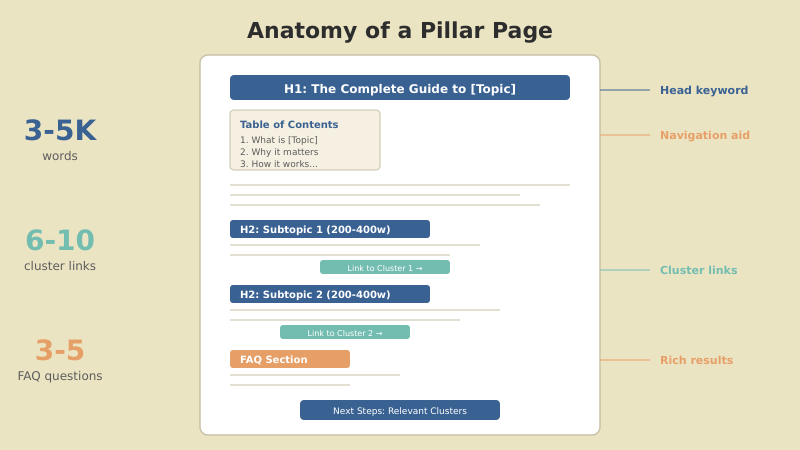
The pillar page is the most important page in your content hub. It’s a comprehensive overview of the broad topic — typically 3,000–5,000 words — that targets your head keyword and links out to every cluster page.
What Makes a Strong Pillar Page
A good pillar page has these characteristics:
- Broad scope, moderate depth — covers every subtopic at a summary level (200–400 words each) without going so deep that cluster pages have nothing to add
- Clear hierarchy — H2s for major subtopics, H3s for supporting points. This structure helps Google understand your topic map
- Links to every cluster — the pillar is the hub that distributes link equity and topical relevance to all supporting content
- Targets the head keyword — “content marketing strategy,” “GA4 complete guide,” “SaaS growth strategy”
- Evergreen content — updated quarterly, not dated. The pillar should be the definitive resource on its topic
Real example: Our content marketing hub
Our content marketing strategy pillar covers everything from audience research to distribution to ROI measurement — at a summary level. Each subtopic links to a dedicated cluster article where we go deep. The pillar ranks for “content marketing strategy” while clusters capture long-tail queries like “content marketing ROI” and “content distribution strategy.”
Pillar Page Types
Not all pillar pages look the same. According to Semrush’s research on pillar pages, the three most effective formats are:
The Complete Guide
“The Complete Guide to [Topic]” — covers a broad subject end-to-end. Best for educational content and thought leadership. Example: “Google Analytics 4: The Complete Guide for Marketers.”
The “What Is” Page
“What Is [Topic]?” — defines a concept, explains why it matters, and outlines key components. Best for newer or more technical topics where the audience needs foundational understanding first.
The How-To Hub
“How to [Achieve Result]” — walks through a multi-step process at a high level, with each major step linking to a dedicated cluster article. Best for actionable, process-oriented topics.
Step 1 — Choose Your Hub Topic
A content hub topic needs to be broad enough to support 6–10 cluster articles, but specific enough that you can realistically own it. Here’s my selection framework:
| Criteria | Too Narrow | Just Right | Too Broad |
|---|---|---|---|
| Subtopics | <4 | 6–10 | 15+ |
| Head keyword volume | <200/mo | 500–10K/mo | 100K+/mo |
| Example | GA4 not set fix | GA4 for marketers | Digital marketing |
Your hub topic should align with your business expertise and audience needs. If you’re a SaaS company, your hubs should center on the problems your product solves — not general marketing advice. As Ahrefs notes in their content pillars guide, the best hubs sit at the intersection of what your audience searches for and what your brand can credibly teach.
Step 2 — Map Your Cluster Architecture
Before writing anything, map every page in the hub. I use a simple spreadsheet with four columns: page title, target keyword, content type, and linking relationships.
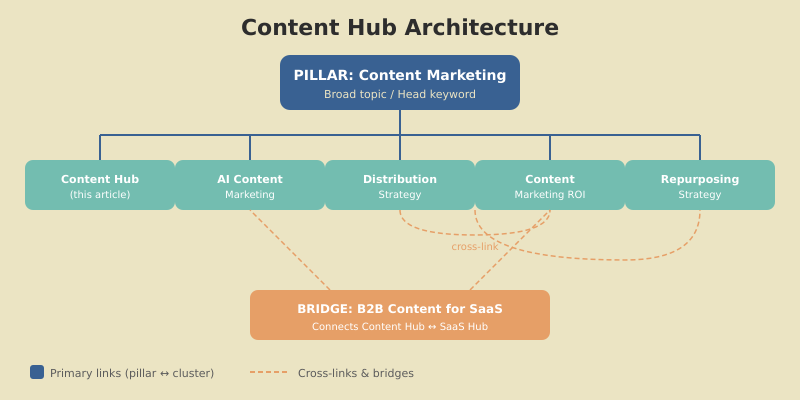
Here’s what a well-planned hub looks like:
[PILLAR] Content Marketing Strategy
 ├── C-1: Content Hub & Pillar Pages      (you are here)
 ├── C-2: AI Content Marketing
 ├── C-3: Content Distribution Strategy   → also links C-5
 ├── C-4: Content Marketing ROI           → also links bridge X-2
 ├── C-5: Content Repurposing             → also links C-3
 ├── C-6: B2B Content for SaaS            → bridges to SaaS hub
 ├── C-7: Content Audit Guide             → also links SEO hub
 └── C-8: B2B Content Calendar
Notice the cross-links. C-3 (distribution) and C-5 (repurposing) naturally reference each other. C-6 bridges to a completely different topic hub (SaaS). These cross-links create a web of topical signals that’s far more powerful than a simple linear structure.
Critical rule: every page in the hub must target a unique keyword. If two cluster pages target the same keyword, they’ll cannibalize each other’s rankings. Map your keywords before writing and verify there’s no overlap with existing content on your site.
Step 3 — Write the Pillar Page
Start with the pillar. It sets the scope for the entire hub and gives cluster pages something to link back to immediately.
Follow this structure:
- Introduction — define the topic, establish why it matters, preview what the reader will learn
- Section for each subtopic — 200–400 words covering the key points, with a link to the dedicated cluster article for deeper reading
- Practical framework or process — give readers something actionable, not just theory
- FAQ section — 3–5 questions that capture long-tail searches and qualify for FAQ rich results
- Conclusion with next steps — direct readers to the most relevant cluster articles based on their needs
Include a table of contents at the top. Pillar pages are long, and users need to navigate directly to the section that answers their question. This also helps Google generate sitelinks in search results, giving your pillar more SERP real estate.
The depth trap
The most common pillar page mistake is going too deep on subtopics. If your pillar exhaustively covers “content marketing ROI” in 2,000 words, your cluster article on that topic has nothing new to add. Keep the pillar broad — let clusters go deep. A good test: if someone reads only the pillar, they should understand the full topic at a surface level. If they want to implement any specific part, the cluster link is right there.
Step 4 — Build Cluster Articles
Cluster articles are where the real depth lives. Each one targets a long-tail keyword, dives deep into a specific subtopic, and links back to the pillar.
Cluster Article Structure
Each cluster article should:
- Target one unique keyword — no overlap with the pillar or other clusters
- Go deeper than the pillar — 1,500–2,500 words of focused, actionable content
- Link to the pillar in the first 200 words — using descriptive anchor text with the pillar’s keyword
- Link to 1–2 sibling clusters — where contextually relevant
- Include 2–3 external links — to authoritative sources that support your claims
Publishing Sequence
Don’t publish clusters randomly. Prioritize for maximum early impact:
- High-intent troubleshooting queries — these rank fastest because they have clear search intent and often lower competition. “How to fix GA4 not set” ranked within 2 weeks for us.
- Cross-linking clusters — articles that naturally connect to multiple hubs strengthen your overall site authority
- Comparison and versus articles — these capture decision-stage traffic and tend to have strong click-through rates
- Foundational how-to guides — fill in the remaining subtopics to complete the hub
Aim for one cluster article per week until the hub is complete. Consistency matters more than speed — Google notices regular publishing on a topic and rewards it with faster indexing over time.

Step 5 — Internal Linking Architecture
The linking structure is what turns a collection of articles into a content hub. Without it, you just have a blog with a category filter.
Mandatory Links
- Every cluster → pillar — in the intro, using anchor text with the pillar’s keyword
- Pillar → every cluster — in the relevant subtopic section. Update the pillar each time you publish a new cluster
Optional but Powerful
- Cluster → sibling cluster — when one cluster naturally references another subtopic (“For more on measuring content marketing ROI, see our dedicated guide”)
- Cluster → different hub’s pillar — bridge articles that connect two topic hubs create cross-hub authority. Our product-led SEO article bridges our SEO, SaaS, and content marketing hubs
According to HubSpot’s topic cluster documentation, bidirectional linking between pillar and clusters is the strongest signal you can send for topical authority. When Google crawls your pillar and finds links to 8 relevant cluster pages — all linking back — it has clear evidence that your site covers this topic comprehensively.
Step 6 — Measure Hub Performance
Track these metrics to know if your content hub is working:
| Metric | Where to Find It | What to Look For |
|---|---|---|
| Pillar page ranking | Google Search Console | Should climb as clusters are added |
| Total hub traffic | GA4 (page path filter) | Compound growth — each new cluster should lift total hub traffic |
| Internal navigation | GA4 (path exploration) | Users moving between hub pages = working links |
| Keyword coverage | GSC (page-level queries) | Hub should rank for 50+ related keywords combined |
| AI Overview citations | Manual search checks | Clustered content gets 3.2x more AI citations |
Common Mistakes When Building Content Hubs
Building the hub in the wrong order
Don’t write cluster articles first and then try to retrofit a pillar page around them. Start with the pillar — it defines the scope and structure for everything else. I’ve seen teams waste months writing clusters that didn’t fit together because they never mapped the hub architecture first.
Forgetting to update the pillar
Every time you publish a new cluster article, go back to the pillar and add a link to it in the relevant section. This is the single most-forgotten step in content hub maintenance — and without it, new clusters don’t get the full benefit of the hub structure.
Starting too many hubs simultaneously
A half-built hub with 3 cluster articles sends weaker topical signals than a complete hub with 8. Finish one hub before starting the next. For most sites, 3–5 content hubs covering your core topics is plenty.
FAQ
How long should a pillar page be?
Most effective pillar pages are 3,000–5,000 words. They need to be comprehensive enough to cover every subtopic at a summary level, but not so exhaustive that cluster pages have nothing to add. The goal is breadth, not depth — each subtopic section should be 200–400 words with a link to the dedicated cluster article.
How many cluster articles does a content hub need?
A strong content hub typically has 6–10 cluster articles around one pillar page. Start with at least 3 clusters to establish the hub structure, then build toward 8+ for maximum topical authority. The key is quality and relevance — every cluster should target a unique subtopic with its own search demand.
Should pillar pages be blog posts or standalone pages?
Either works, but standalone pages tend to perform better because they can be placed in your main navigation and aren’t pushed down by newer blog posts. Use clean URLs without date structures. What matters most is that the page is permanently accessible, regularly updated, and prominently linked from your site structure.
How often should I update my content hub?
Review your pillar page quarterly and update statistics, examples, and links. Cluster articles should be refreshed every 6–12 months or whenever the topic changes significantly. Add new clusters when you identify gaps in your coverage. Outdated content hurts topical authority more than having fewer articles.
Can I turn existing blog posts into a content hub?
Absolutely — and you should. Audit your existing content for articles that cover related subtopics. Create a pillar page as the central hub, then update existing articles with internal links to the pillar and to each other. Fill gaps with new cluster articles. Retrofitting existing content into a hub is faster than building from scratch.
Build Your First Content Hub This Month
Content hubs aren’t theoretical — they’re the most practical way to build topical authority and compound your organic traffic over time. The structure is simple: one pillar page that covers the broad topic, 6–10 cluster articles that go deep on subtopics, and a linking architecture that connects everything.
Start today: pick one topic your site should own. Map 6–8 subtopics with unique keywords. Write the pillar page first, then publish one cluster per week. By the end of the quarter, you’ll have a complete content hub that drives more traffic than the same articles would individually.
For a complete content marketing strategy that includes hub planning, audience research, and distribution, check our pillar guide. And if you want to understand how hubs fit into your broader SEO strategy, that’s the place to start.